Hiring
Drug Testing
Employment Screening


If you close your laptop after an incognito session, does your digital footprint actually vanish, or are you just hiding from your own history? A 2017 study by DuckDuckGo revealed that 76% of participants couldn't accurately identify what private browsing actually protects. You likely use these features to keep your search history private from family or colleagues. It's a common relief to know your recent activity won't haunt your browser's auto-fill bar during a presentation or a shared session.
However, there's a distinct difference between clearing your local cache and passing a professional screening, especially since 94% of employers now conduct some form of background check according to a 2021 PBSA report. This article helps you discover exactly what private browsing shields, what remains visible to your internet service provider, and why a formal screening process focuses on verified public records rather than your temporary cookies. We'll break down the technical limits of your browser and provide a simple, three-step guide to manage your digital reputation with absolute clarity and peace of mind.
Incognito mode functions as a local browser state designed to limit the digital footprint left on a specific device. When you activate this feature, your browser stops saving your search history, cookies, and information entered in forms. It's a tool built for shared environments. If you share a laptop with a colleague or family member, this setting ensures they won't see your previous sessions. However, the term "private" is often misunderstood. It refers strictly to the local user profile on your machine, not your entire internet connection or digital identity.
As of 2026, browser standards continue to uphold these fundamental local-only privacy rules. While technology has advanced, the core architecture of incognito browsing remains unchanged. It doesn't encrypt your traffic or hide your IP address from the websites you visit. For employers and candidates alike, understanding this distinction is vital for maintaining professional digital hygiene and achieving true peace of mind during the hiring process. Simplicity in tools shouldn't be mistaken for total anonymity.
Major browsers like Chrome, Safari, and Firefox offer similar protections with slight variations in execution. Chrome's incognito mode and Safari's Private Browsing both focus on session-based data. This creates a clean slate for the next person who picks up the device. Here is a breakdown of the data management involved:
Users often turn to private windows for practical, everyday reasons. You might use it to shop for a surprise gift, bypass certain article paywalls, or research sensitive health topics without seeing related ads for the next month. This creates a sense of control over one's digital environment. However, the "spy" or "cloak" icons used by developers often lead to a false sense of security. A 2024 industry report indicated that nearly 40 percent of users believe private mode hides their physical location from websites, which is factually incorrect. Incognito mode protects your secrets from your spouse, not from the servers that power the web. True security requires a more robust approach to data integrity and verification.
Browsing in incognito mode doesn't grant you digital invisibility. It simply prevents your browser from saving your history, cookies, and form data locally. While your roommate or spouse won't see your search history, three major entities maintain a clear view of your online behavior: your Internet Service Provider (ISP), your employer, and the websites you visit. This distinction is vital for maintaining professional integrity in a digital-first world.
Your ISP acts as the gateway to the internet. It logs every IP address you connect to, regardless of your browser settings. These logs often persist for several months to comply with data retention laws. On a corporate network, privacy is even more limited. IT departments use sophisticated firewalls and DNS logs to track traffic. If you're using a company-owned device or office Wi-Fi, your activity is fully transparent to your employer. Systems often flag specific keywords or restricted domains in real time, making private browsing modes irrelevant for avoiding workplace monitoring. Ensuring your online habits reflect professional standards provides true tranquillité d'esprit during internal audits or compliance reviews.
Websites have evolved far beyond simple cookies. Digital fingerprinting allows sites to identify you by aggregating technical data points, including:
Research suggests that digital fingerprinting can identify users with 99% accuracy. By 2026, tracking technology is projected to shift almost entirely to server-side methods that bypass traditional browser privacy controls. Furthermore, the moment you log into an account like LinkedIn or Gmail while in incognito mode, the website immediately links your current session to your permanent identity. The "private" wall vanishes instantly. You aren't just a guest; you're a known user with a traceable path. This technical reality means your digital footprint is much more permanent than a cleared history suggests.
Staying informed about these limits is the first step in managing your professional reputation. Modern security isn't about hiding; it's about understanding how data works to ensure your background remains beyond reproach.
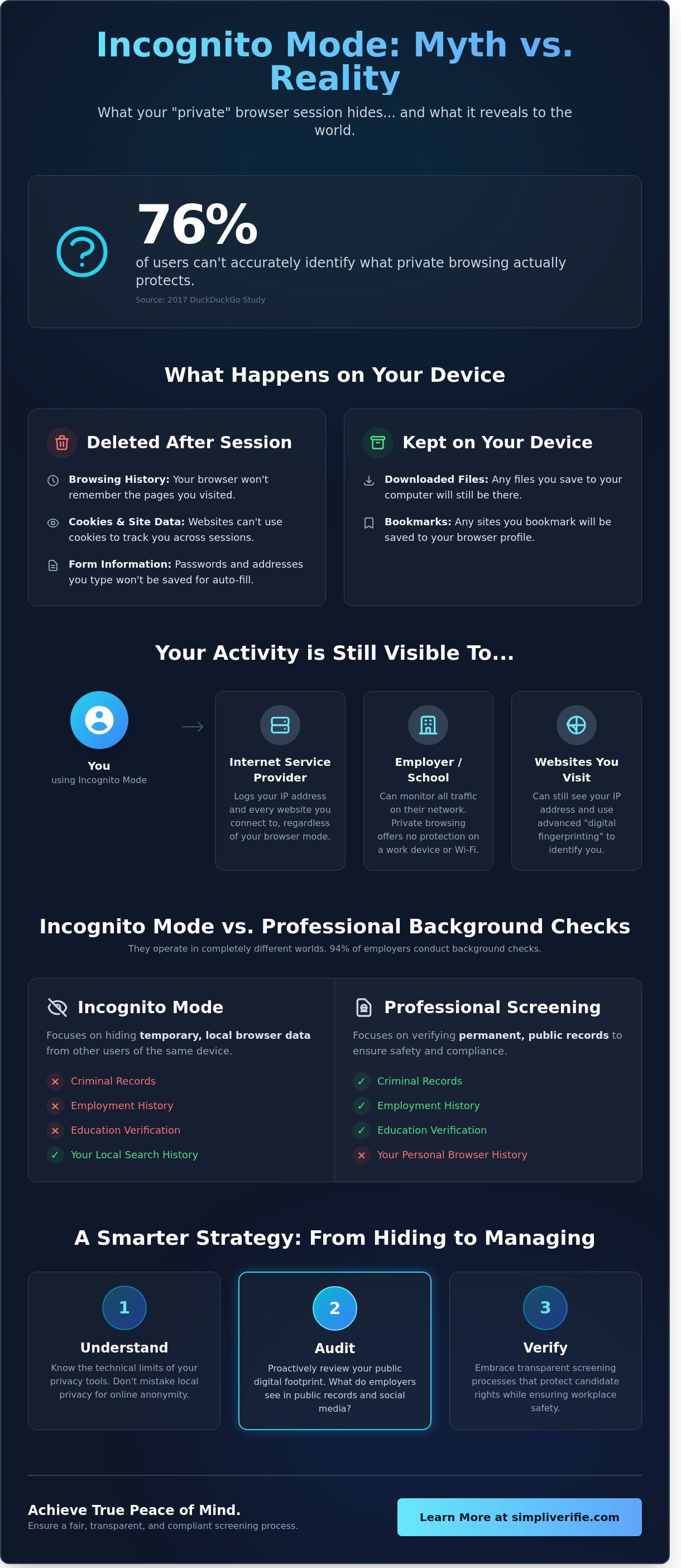
A common fear among job seekers is that a deep dive into their digital past includes their private search history. This is a myth. Professional screening firms don't hack your computer or access your local browser data. There's a massive gap between the temporary files on your laptop and the permanent entries in a government database. While professional background checks are thorough, they rely on verified legal and financial documents. They don't care if you used incognito mode to check a medical symptom or buy a gift. Federal laws like the Fair Credit Reporting Act (FCRA), enacted in 1970, strictly regulate what data is fair game. These rules ensure your personal privacy remains intact while employers get the facts they need to maintain a safe workplace.
Professional screenings focus on official records that leave a paper trail. This process is about verification, not snooping through your private habits. A standard report typically includes:
Screening companies don't have the legal authority or technical means to pull your incognito history. They focus on official, verifiable milestones that define your professional reliability and integrity. This approach provides the transparency employers need without overstepping into your personal digital life.
People often confuse private browsing with private social profiles. Using a secret window doesn't hide what you post publicly. If you post a controversial comment on a public forum, it exists on a server, not just your local history. Data brokers often aggregate this information into "shadow profiles" before you even think to delete it. Modern background checks might include a social media sweep, but they look at public-facing content. They don't bypass your browser's security settings to see what you did in a private tab. Your privacy depends more on your account settings and posting habits than the type of browser window you open. SimpliVérifié ensures these checks stay within legal bounds, providing peace of mind for everyone involved.
Relying on incognito mode to protect your career is a reactive strategy that often fails. In 2026, your digital footprint has become a permanent extension of your professional resume. Successful candidates shift their mindset from hiding past actions to curating a deliberate online identity. This approach transforms your digital presence from a potential liability into a strategic asset. It's about building a narrative that reflects your current professional standards and integrity. A clean digital record ensures career longevity. 70% of employers in a 2025 survey stated they rejected candidates based on content found online. Proactive reputation management provides the tranquility of mind needed to move through the hiring process with confidence.
Start with a vanity search across Google, Bing, and DuckDuckGo. 75% of recruiters in a 2024 study admitted that search results influence their hiring decisions. You should also audit third-party data broker sites. These platforms often aggregate outdated or sensitive personal info without your consent. For issues that require professional intervention, Content Removal can help you eliminate harmful online content and clear your digital path. Finally, scrub old social media accounts. Content from a decade ago can still impact your professional integrity today. Check abandoned blogs or forum posts that might still appear in cached search results.
Privacy by design means making security a habit. Use a VPN alongside incognito browsing to encrypt your network traffic and mask your IP address. This prevents ISPs and local networks from logging your activity. Additionally, separate your personal and professional devices. 62% of security breaches in 2025 originated from personal data "cross-pollinating" with work systems. Your digital reputation is built on what you share publicly, not what you browse privately.
Maintaining a clean record isn't just about passing a single background check. It's about protecting your trajectory for the next decade. Modern screening tools are more precise than those used in 2020. They identify inconsistencies quickly. By auditing your footprint now, you remove friction from future career moves. This proactive stance demonstrates the high level of professional responsibility that top-tier employers demand. It simplifies the verification process for everyone involved.
Beyond just auditing public information, taking control of your personal digital assets is a hallmark of professional responsibility. To securely manage and protect your most sensitive documents for the long term, check out IronClad Family.
Ready to ensure your professional profile is ready for your next big move? Get the clarity you need with a professional check.
Secure your professional reputation with SimpliVérifié todayHiring decisions require more than a quick search. While users might rely on incognito settings to keep their personal browsing private, professional background checks operate on an entirely different level of data retrieval. SimpliVerified stands as a strategic partner for businesses that value high-integrity hiring practices. We bridge the gap between digital privacy and necessary workplace safety. We turn a bureaucratic burden into a friction-free experience, allowing you to hire with confidence while ensuring every check respects candidate rights.
Our process removes the guesswork. We focus on verified legal records rather than the digital footprints left behind during casual internet use. This distinction matters because it separates irrelevant noise from the actionable signals you need to build a secure team. By choosing a professional firm, you gain access to a streamlined system that delivers results with speed and absolute precision. It's about clarity and certainty in every hire.
We distinguish between browser habits and legal records with surgical precision. Casual searches often turn up unreliable information, but our technology-driven process pulls from 3,500 plus county courts across the United States. This ensures that an incognito window won't hide what truly matters for employment eligibility. Efficiency is our standard; we deliver accurate reports in as little as 24 to 48 hours, a timeline that keeps your recruitment moving without delays.
Draper organizations trust us because we understand the local market and the specific needs of Utah businesses. Our headquarters in Draper, UT, reflects our commitment to high-integrity hiring. We provide the tools to verify identity, criminal history, and employment records without invading a candidate's personal digital life. This local presence ensures we remain accountable to the community we serve.
Compliance isn't just a checkbox; it's a shield for your company. We ensure every background check adheres to the Fair Credit Reporting Act (FCRA) and specific Draper, UT regulations. Informal searches, like looking through social media, often lead to legal pitfalls and unintended bias. Our structured approach avoids these risks, offering you true peace of mind. Our platform also automates the consent process, making the candidate experience as smooth as the employer's. You can focus on growth while we handle the complex regulatory landscape. Ensure your hiring process is professional and compliant with SimpliVerified.
Relying on incognito mode to protect your professional reputation is a risky strategy that doesn't hold up under scrutiny. While private browsing hides local history from your device, it doesn't mask the public records or legal databases that define your background. As we navigate the digital landscape of 2026, transparency is the only way to build lasting trust with employers. Real security comes from proactive management rather than hiding behind a browser setting. You need a partner who understands the technical and legal realities of modern verification.
SimpliVerified delivers this clarity through expert-led verification services based in Draper, Utah. Our team provides FCRA-compliant reporting that ensures every detail is accurate and legally sound. With a nationwide network of 15,000+ collection sites, we make the process fast and accessible regardless of your location. We turn a stressful bureaucratic hurdle into a smooth, professional experience that protects your career growth. Stop wondering what your record says and start building your future with confidence.
Get a Professional, Compliant Background Check Today
No, incognito mode doesn't hide your IP address from the websites you visit. Your IP remains visible to site owners, allowing them to identify your general location and network provider. According to Google’s 2024 Chrome technical update, private browsing specifically focuses on local data like cookies and history. To mask your IP effectively, you'd need a tool like a VPN or a proxy server.
Yes, your employer can still track your activity even when you use incognito mode on a company device. Most corporate environments use enterprise management software or firewalls that log traffic at the network level. A 2023 survey by Spiceworks found that 76% of organizations monitor employee internet usage. This data is captured before it even reaches your browser, ensuring company policy compliance and security.
No, professional background checks don't include your private browser history. Investigators focus on verified records such as criminal databases, employment history, and education credentials. Under the Fair Credit Reporting Act (FCRA), background screening firms like SimpliVérifié access public and private databases rather than personal devices. Your 10-year criminal record or 7-year credit history is the priority, ensuring simplicity and accuracy in the vetting process.
Incognito data doesn't stay on a router in a permanent cache, but the hardware logs your connection requests in real-time. Most consumer routers maintain logs for 24 to 72 hours depending on their internal storage capacity. System administrators can access these logs to see which domains you visited. While the specific pages might be encrypted via HTTPS, the destination URL remains visible in the router's traffic history.
No, incognito mode provides zero protection against identity theft or phishing attacks. It doesn't encrypt your data or block malicious software from stealing your credentials. The FBI’s 2023 IC3 report noted that over 800,000 cybercrime complaints were filed, many involving data breaches that bypass browser settings entirely. You need multi-factor authentication and robust security software to ensure true tranquility of mind during your online sessions.
The primary difference is that a VPN encrypts your entire internet connection while incognito mode only hides activity from other people using your computer. A VPN masks your IP address and secures your data from your ISP. In contrast, incognito mode simply prevents your browser from saving cookies and search history locally. Combining both tools offers a more comprehensive layer of privacy for your digital footprint.
Yes, websites can identify you if you log into your personal accounts while using an incognito window. Even if you don't log in, sites use browser fingerprinting to track users based on screen resolution and installed fonts. Research from Princeton University shows that 70% of top websites use tracking that persists across different browsing sessions. Your identity isn't hidden if your online behavior remains consistent.
No, your Internet Service Provider (ISP) sees every website you visit regardless of your browser settings. Under current Canadian and US regulations, ISPs are often required to retain metadata for 6 to 24 months. Incognito mode only affects what’s stored on your physical device. Your ISP continues to log your DNS requests, which provides them with a complete map of your online destinations and browsing timing.